External systems
Email settings tab
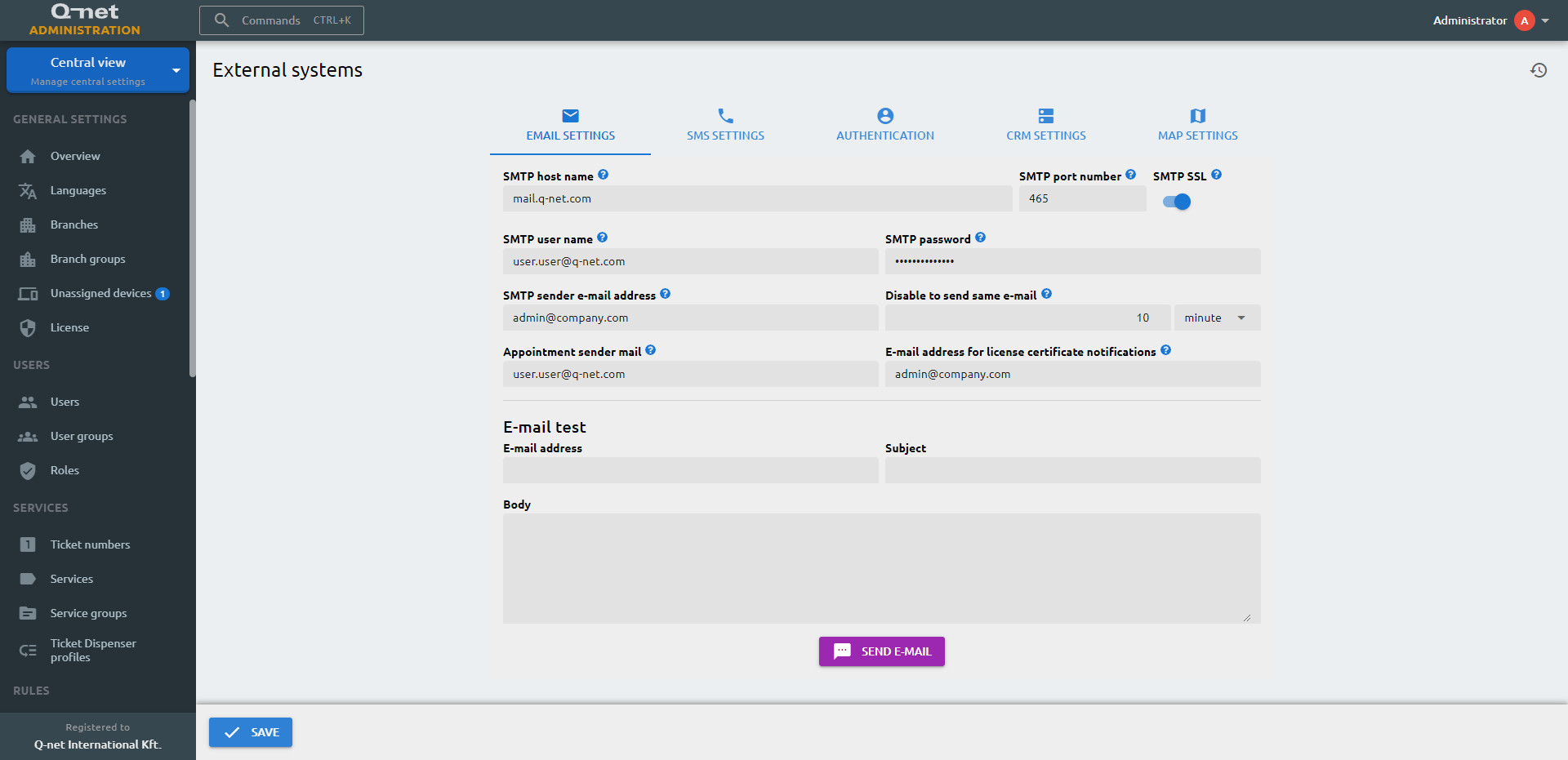
Here you will be able to set the systems e-mail notification properties. The system will be able to send reports, alerts and appointment confirmations/reminders if configured that way.
SMTP host name
Host name of the SMTP server
SMTP port number
Port of the SMTP server. Usually 25 without SSL and 465 with SSL
SMTP SSL
EnableSSL
SMTP user name
SMTP email address.
SMTP password
Password for the SMTP email address
SMTP sender e-mail address
Email address that will appear in the sent emails
Disable to send same e-mail
Disable to send the same e-mail in a configured timed limit
Appointment sender mail
E-mail address for sending appointment-related e-mails
E-mail address for license certificate notifications
E-mail address for sending license related e-mails
SMS settings tab
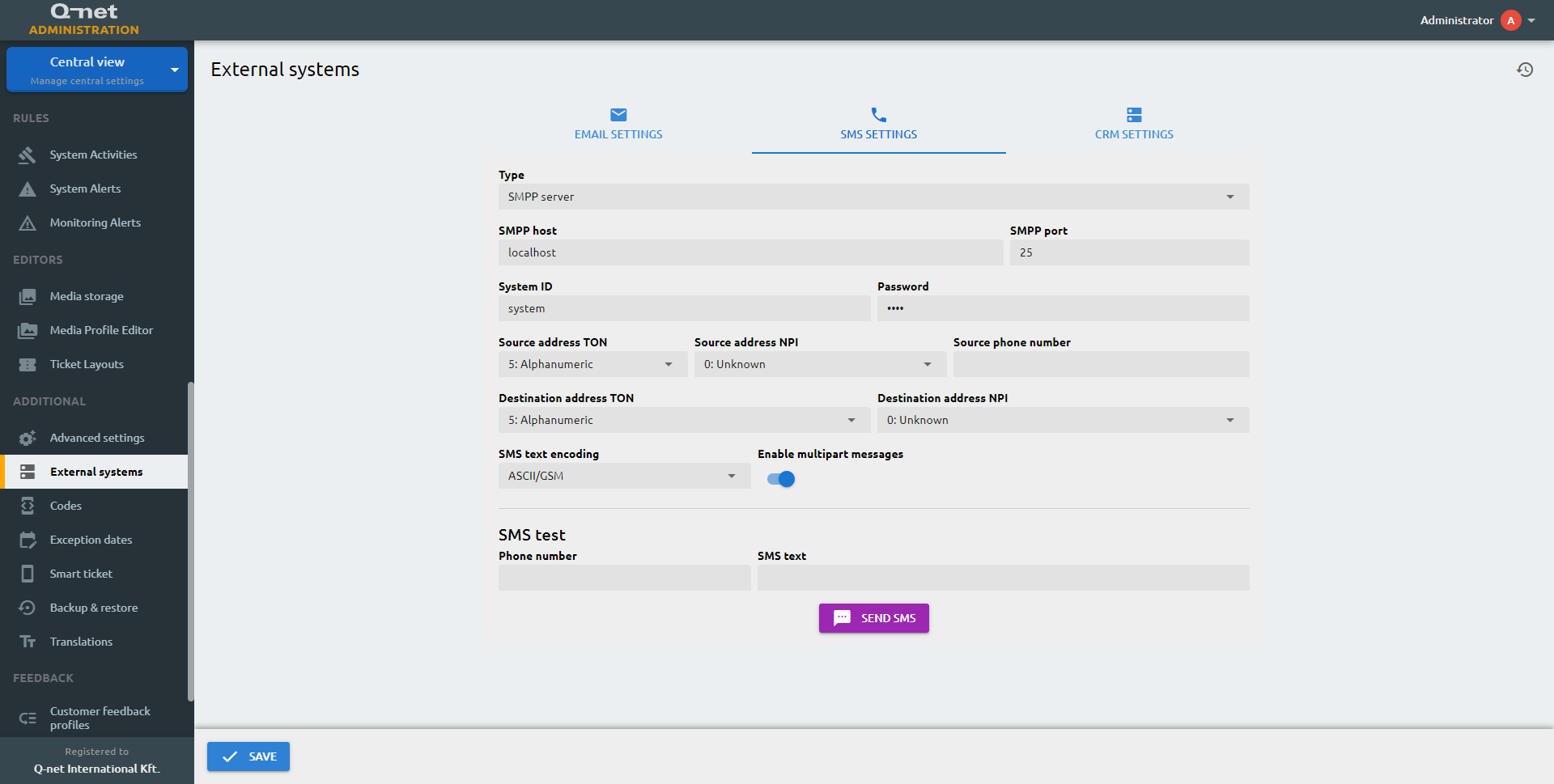
If the end user has purchased the Alerts optional software module the messages can be sent on SMS too. You configure the SMS sending properties in this zone.
Type
You can use an SMPP or Twilio server to send out SMS messages
SMPP host
SMPP host IP address or domain name
SMPP port
Port of the SMPP server
System ID
SMPP System ID
Password
SMPP password
Source address TON
Type of Number (TON) specifies if the number is a full international number, country code number, or an alphanumeric sender.
Source address NPI
Numbering Plan Indicator (NPI) specifies the numbering standard, the given mobile number is being followed.
System type
An optional login parameter that should be set only if required by the SMPP server, provided by the SMPP system provider.
Source phone number
Source phone number
Destination address TON
Destination address TON (Type of Number)
Destination address NPI
Destination address NPI (Numbering Plan Indicator)
SMS text encoding
Encoding type, which can be ASCII/GSM or UCS-2/Unicode
Enable multipart messages
Enable multipart SMS messages
Account SID
Account SID
Authorization token
Authorization token
Authentication tab
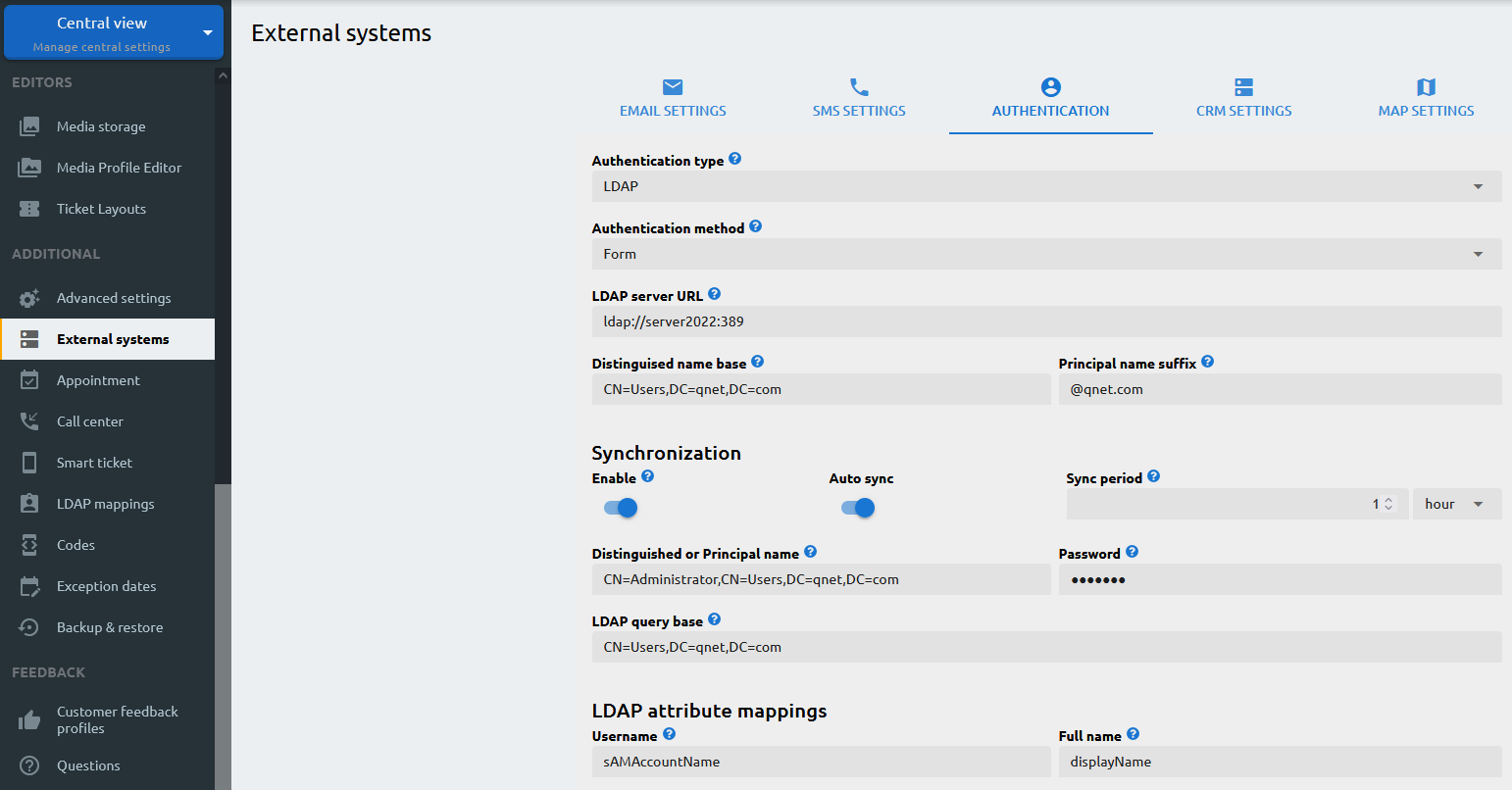
Authentication type
User verification can be accomplished through either the system database or LDAP
Authentication method
Authentication is possible by entering a username and password into a dedicated login form or by Single sign-on (SSO)
LDAP server URL
LDAP server URL
Distinguised name base
Distinguised name base specifies the starting point for searches in the LDAP directory tree. It represents the “root” of the LDAP directory, from which all other entries in the tree descend.
Principal name suffix
(UPN suffix) is the part of a User Principal Name (UPN) that identifies the domain to which the user belongs. It is typically the DNS domain name of the organization or company that manages the domain.
Enable
If enabled, the system will periodically synchronize the Q-net users with the LDAP users
Sync period
The period of the synchronization
Distinguished or Principal name
Unique identifier in the LDAP system
Password
LDAP synchronization password
LDAP query base
the search base or distinguished name base is a special LDAP object identifier (DN) that specifies the starting point for searches in the LDAP directory tree. It represents the “root” of the LDAP directory, from which all other entries in the tree descend.
Username
LDAP synchronization username
Full name
LDAP synchronization full name
E-mail
LDAP synchronization email address
External ID
LDAP synchronization external ID
SSO type
Select the single-sign-on service provider.
OAuth URL
The SSO service provider’s URL.
Client ID
The client ID that will be used to synchronize accounts.
Client Secret
The secret string of the Client ID.
Matching property
The user in the OAuth database will be identified by this property given in the server.
Username
The username will be sychronized with the configured property name.
Full name
The full name will be sychronized with the configured property name.
E-mail
The e-mail address will be sychronized with the configured property name.
External ID
The External ID will be sychronized with the configured property name.
Avatar
The user’s avatar picture will be sychronized with the configured property name.
Roles
The roles will be sychronized with the configured property name.
Enable user registration
When enabled, users signing in through the single sign-on provider for the first time are automatically created as new accounts. When disabled, only users that already exist in the system can sign in.
CRM settings tab
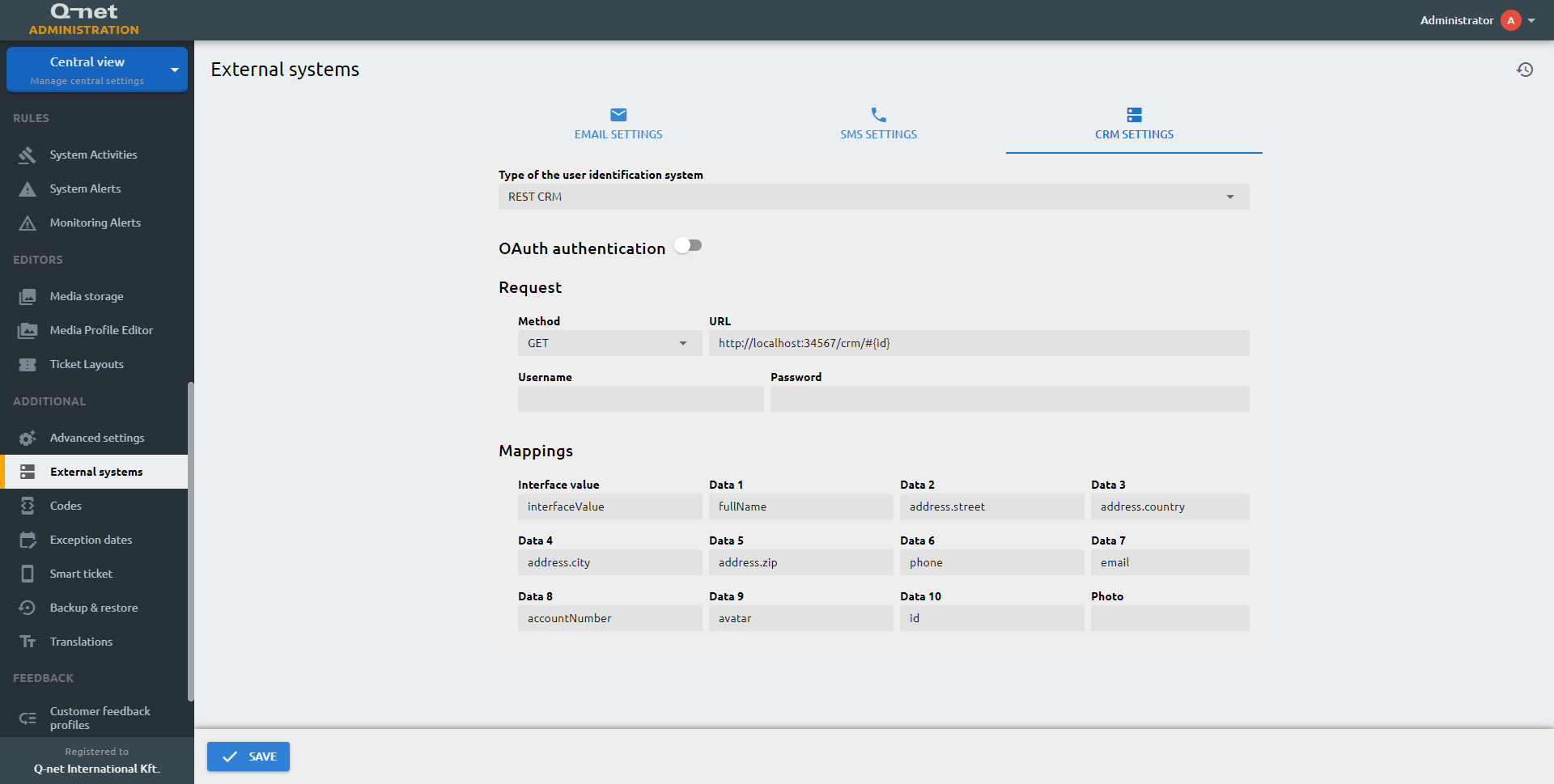
Type of the user identification system
The identification can be done by Trust CRM, REST CRM or SQL CRM
Interface value
Returned value from the CRM system
Min. length
Identifier mininum length
Max. length
Identifier maximum length
Copy ID target
Data field where the system stores the returned value
Copy ID regex
Returned value can be modified by regex, before it stored in the target field
Method
REST method
URL
REST server url
Username
REST authentication username
Password
REST authentication password
Content type
Content type header sent with the REST request (shown when the method is not GET).
Body
Request body sent with the REST request (shown when the method is not GET).
Interface value
JSON path for the interface value
Data 1
JSON path for data field 1
Data 2
JSON path for data field 2
Data 3
JSON path for data field 3
Data 4
JSON path for data field 4
Data 5
JSON path for data field 5
Data 6
JSON path for data field 6
Data 7
JSON path for data field 7
Data 8
JSON path for data field 8
Data 9
JSON path for data field 9
Data 10
JSON path for data field 10
Photo
JSON path for the user’s photo
CRM Query
SQL Query that returns the requested data
CRM Driver class
CRM Driver should be modified carefully
CRM Connection String
SQL connection string
CRM User name
CRM username for connecting the SQL server
CRM password
CRM password for connecting the SQL server
API Keys

Google Maps API key
The Live Map in the Monitoring view shows your branches on a map and requires a Google Maps API key. The key can be generated on the following link
Turnstile Site key
To utilize Cloudflare’s challenge platform, provide the API key here.
Google TTS
To utilize the Google’s text-to-speech service, provide the API key here.
OpenAI
To utilize the OpenAI’s text-to-speech service, provide the API key here.